Error
close
Porfavor rellene todos los campos
Developed by Hoteligy.com
Home
home
Stay information
keyboard_arrow_right
Buffet Restaurants
keyboard_arrow_right
A la carte Restaurants
keyboard_arrow_right
Bars & Snacks
keyboard_arrow_right
Services
keyboard_arrow_right
Platinum Club
keyboard_arrow_right
Family Club
keyboard_arrow_right
UMA ChillOut
keyboard_arrow_right
search
cancel
arrow_back
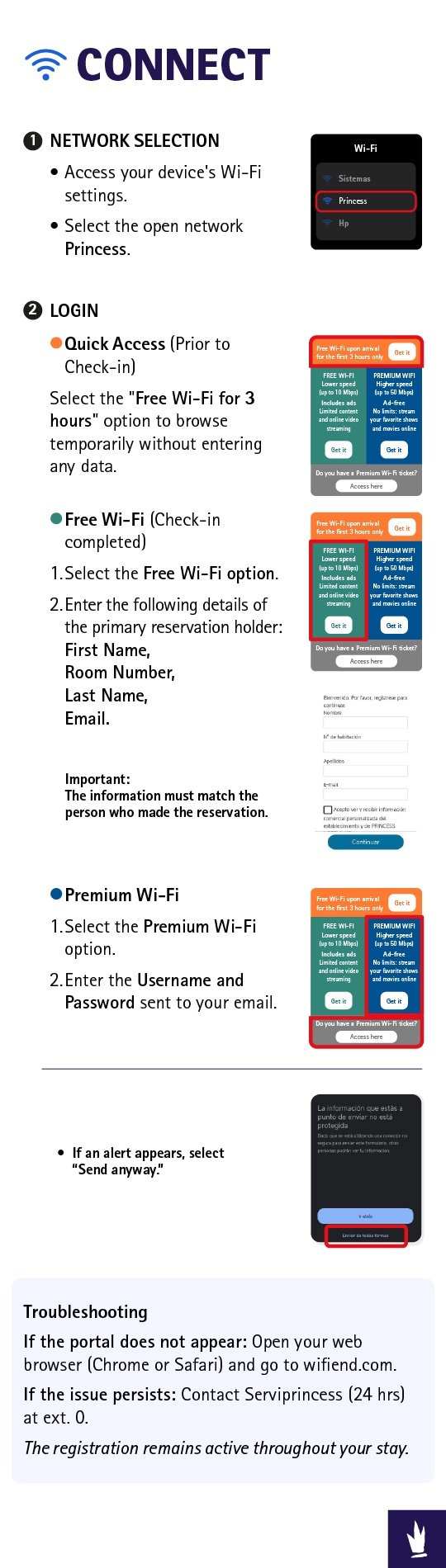
WiFi Guide
search
search
language
EN - English
ES - Español
home
info
Admin PIN
Supervisor Pin
error
Supervisor Pin ERROR
The provided Supervisor PIN is Wrong.
El pin de supervisor introducido es erroneo.
Wifi